Multi-Discipline Supports
User Guide
Using the MDS Application : Special Supports : Modify a Special Section
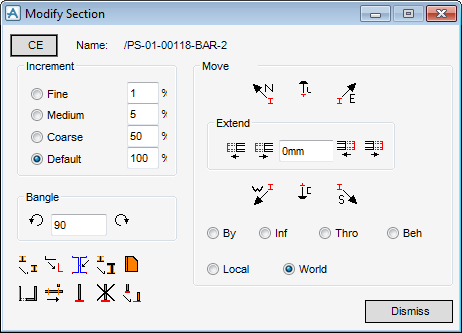
The Modify Section icon  allows the user to extend any special section SCTN end, rotate special sections using Bangle, flip special sections, and modify the special section justification of the current special support.
allows the user to extend any special section SCTN end, rotate special sections using Bangle, flip special sections, and modify the special section justification of the current special support.|
2.
|
|
Figure 2:29.
|
|
3.
|
Move each of the existing MDS sections in turn using the Move icons, for example
 moves the current section north and moves the current section north and moves the current section down. CE allows the user to change to other sections that are part of the special supports. moves the current section down. CE allows the user to change to other sections that are part of the special supports. |
The user can also extend or shorten the current section start/end by a distance they input in the Extend text field. Use the 


 icons to extend/shorten by the value the user entered.
icons to extend/shorten by the value the user entered.The user can control the overall percentage movement and extension/shortening of the section using the Increment text fields.
The Default percentage field is set to 100%. If the user select Medium percentage increment at 5%, the selected section is moved or extended/shortened by 5% of the Extend text field value. All of the Increment fields except the Default can be modified.
|
4.
|
The user can control the overall rotation angle using the Bangle text field. The default value is 90° and the maximum allowed is 180°.
|
|
|
|
 |
|
 |
|
 |
|
 |
|
 |
|
 |
|
 |
|
 |
|
 |
