Multi-Discipline Supports
User Guide
Hangers : Modify a Hanger : Additional Modification Options
To make additional modifications click on the icon on the Hanger window (Figure 5:3.: Hanger window. The Modify Hanger window (Figure 5:7.: Modify Hanger window) is displayed.
icon on the Hanger window (Figure 5:3.: Hanger window. The Modify Hanger window (Figure 5:7.: Modify Hanger window) is displayed.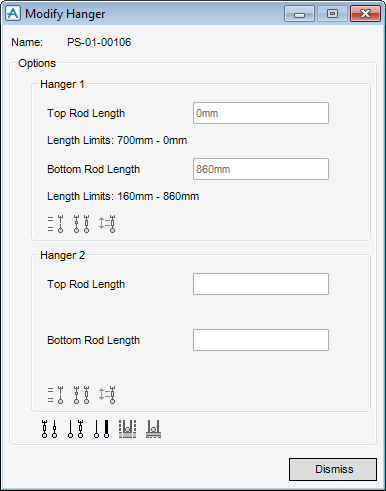
|
Figure 5:7.
|
|
Note:
|
Some of the options shown in Figure 5:7.: Modify Hanger window are deactivated because they are not applicable to the current hanger configuration.
|
The hanger type associated with the hanger window shown in Figure 5:7.: Modify Hanger window is a fixed single hanger with a turnbuckle and two rods.
Each rod has a minimum and maximum allowed length. These values depend on the limits set by the MDS Administrator. Refer to the MDS Administrator Guide for more information.
 icon.
icon. icon. The fixed hanger configurations window opens with the appropriate filter is activated. In this case it is the first filter (
 ).
).|
5.
|
Click OK. The fixed hanger configurations window closes and the hanger window is re-displayed.
|
|
6.
|
Click on the
 icon. The Modify Hanger window is displayed. icon. The Modify Hanger window is displayed. |
 icon. The hangers configuration window is displayed. The window lists only variable hanger configurations. The active filter is the single-hanger filter (
 ) because this is a single-hanger and the application assumes that in most cases the user will modify the configuration within the same hanger category. The user can change the category by clicking on a different filter icon. For the purposes of this explanation, the default filtered list is used.
 |
4.
|
 . The
. The  has been activated.
|
7.
|
Click OK.
|
 icon. The standard sheets for hangers are displayed.
 icon. The hanger dimensions are displayed.
 icon. The graphical view of the support being created or modified is refreshed. The view scale is not modified.
  icon. The hanger is connected to a new steelwork beam.
 icon. The user can now add a note to be displayed on the hanger drawing.
|
•
|
For a steelwork section that is parallel to the pipe, use Distance or Through. This is not considered as a reconnection action since the fitting only moves to the new position. It is not replaced with a new fitting.
|
