Multi-Discipline Supports
User Guide
Hangers : Modify a Hanger
|
1.
|
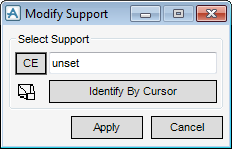
Select Modify > Support… from the main menu. The Modify Support window (Figure 5:4.: Modify Support window) is displayed.
|
|
Figure 5:4.
|
|
•
|
Type a name into the Support Name text field.
|
|
•
|
Click CE to modify the current element if it is a support.
|
|
•
|
Click Identify By Cursor.
|
In all cases, the name of the hanger is displayed in the Support Name text field.
|
3.
|
Click Apply. The hanger window, which is now shown, displays all relevant manipulation icons. For an overview of the icons refer to the table in Modify a Support.
|
