Multi-Discipline Supports
User Guide
Hangers
:
Modify a Hanger
: Rotate all Hanger Members
Rotate all Hanger Members
All hanger members that can be rotated, rotate about the world z-axis by the given angle. If the hanger has a configuration with more than one hanger, the application prompts the user to identify the hanger to rotate.
To rotate all hanger members:
1.
Click on the
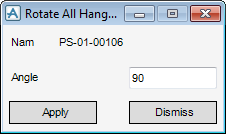
icon. The application displays the Rotate All Hanger Members window
(
Figure 5:5.: Rotate All Hanger Members window
).
Figure 5:5.
Rotate All Hanger Members window
2.
Enter the angle in degrees by which the user wants to rotate the hanger.
3.
Click
Apply
.
1974 to current year.
AVEVA Solutions Limited and its subsidiaries. All rights reserved.
 icon. The application displays the Rotate All Hanger Members window