Multi-Discipline Supports
User Guide
Using the MDS Application : Repeat a Support : Repeat a Standalone Ancillary
To repeat a standalone ancillary, on the Supports tab, in the Tools group, click Repeat Support, select Ancillary from the list. The user is prompted to Identify MDS Ancillary to Repeat.
|
Figure 2:20.
|
|
3.
|
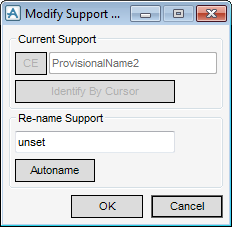
Type a name in to the Re-name Support text field, or click MDS Autoname to generate the name automatically. If the user clicks on Cancel, the name displayed in the Current Support field (ProvisionalName<n> is assigned by default.
|
|
4.
|
Click OK to apply the name change.
|
To exit the procedure, press the Esc key on the keyboard.
