Multi-Discipline Supports
User Guide
Using the MDS Application : Delete a Support
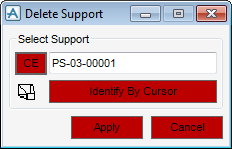
To delete a support, on the Supports tab, in the Modify group, click Delete Support to display the Delete Support window.
|
Note:
|
The buttons on this window are highlighted in red to distinguish it from the Modify Support window.
|
Identify the support to be deleted by entering a name into the Support Name text field, clicking CE to delete the current element if it is a support or clicking Identify By Cursor.
When the support has been identified, the user can use the Centre on Support icon to view the support in the centre of the graphical view. Click Apply.
