Structural Design
User Guide
Panel Fittings : Single Panel Fitting
On the Plates tab, in the Create group, click Fittings, select Single Panel Fitting from the list to display the Create Panel Fitting window.
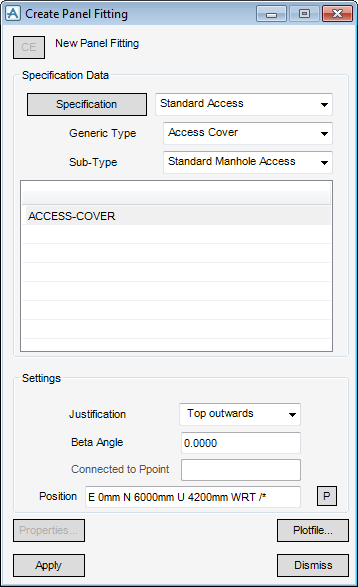
The Create Panel Fitting window allows the user access to all available panel fitting specifications in the current catalogue. As a new panel fitting is created, rather than modify the specification of a panel that already exists, by default the window is set as a New Panel Fitting as the current element.
To select a current detailing specification, from the Specification Data pane of the Create Panel Fitting window, select Specification for Standard Access, Access Cover, Standard Manhole Access, ACCESS_COVER.
From the Settings pane of the Create Panel Fitting window, select the Justification of the single panel fitting. These options allows the user to specify the panel plane (top, centre or bottom) which is to be used as the alignment datum and the orientation of the fitting relative to this plane, as shown:

By default, the fitting is positioned at the origin of its owning panel. To position the fitting at another position, from the Create Panel Fitting window, click Pick Position. The Pick Fitting Position window is displayed and automatically populated with co-ordinates of the origin of its owning panel. The user is also prompted to Pick Fitting Position (Snap) Snap:
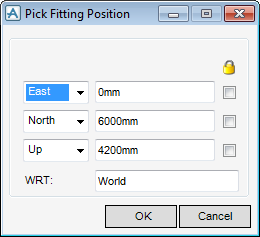
From the Pick Fitting Position window, the coordinates of the picked position is automatically updated in the Create Panel Fitting window.
To create the fitting from the Create Panel Fitting window, select Apply. The new panel fitting is displayed in the model explorer as a PFITTING owned by the PANEL.
Click to identify the PFIT as the CE, from the main menu bar select Orientate > ß Angle > 90 Degrees to rotate the fitting within the plane of the panel. (The default orientation has the Beta Angle set to zero.)
