Structural Design
User Guide
Modify Sections
: Modify Sections Joint Line
Modify Sections Joint Line
The Modify Joint Line functionality can be used to modify the attributes of a FIXING element, owned by a GENSEC.
To set the justification to LTOC leaving the Joint line.
From the
SECTIONS
tab, in the
Modify
group, click
Section
, select
Joint Line
from the drop-down list to display the
Section Joint Line
window.
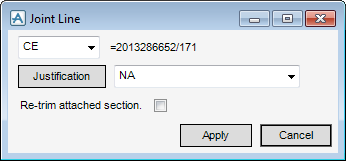
The functionality available to the user is identical to that available from Modify Section Justification, refer to
Modify Sections Justification
.
1974 to current year.
AVEVA Solutions Limited and its subsidiaries. All rights reserved.