Multi-Discipline Supports
User Guide
Lighting Supports : Modify a Lighting Support
|
1.
|
Click on the Modify Support icon
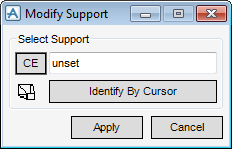
 on the toolbar or select Modify > Support from the main menu. The Modify Support window is displayed. on the toolbar or select Modify > Support from the main menu. The Modify Support window is displayed. |
|
Figure 8:3.
|
|
•
|
Type a name into the Support Name text field.
|
|
•
|
Click CE to modify the current element, if it is a lighting support.
|
|
•
|
Click Identify by Cursor then click on the support in the graphical view
|
 to view the support in the centre of the graphical view.
|
3.
|
Click Apply. The Modify Lighting Support window is displayed. This is the same window that is used during creation of a new support, see Figure 8:2.: Modify Lighting Support window.
|
|
5.
|
Click OK to confirm the changes made. If Cancel is clicked the support is reset to the state prior to modifying.
|
