Multi-Discipline Supports
User Guide
Welding Application : Position Welds on a Framework or Special Pick
There are two methods of positioning welds using weld position options on the Framework Weld Selection window (Figure 9:1.: Framework Weld Selection window). They are:
|
1.
|
|
2.
|
Select Pick on the Framework Weld Selection window (Figure 9:1.: Framework Weld Selection window). In either case, the Set Weld Position window is displayed. Welds can be made on either a single Pline or on Pline Intersections.
|
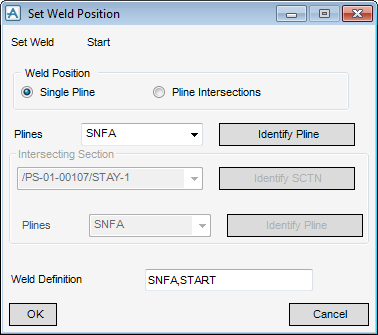
For single position welds, the Set Weld Position window is as shown in Figure 9:3.: Set Weld Position window (single Pline).
|
Figure 9:3.
|
On the Set Weld Position window:
|
1.
|
Select the Single Pline radio button.
|
|
2.
|
Click Identify Pline.
|
The selected Pline, and start or end (as appropriate), appear in the Weld Definition text field.
|
1.
|
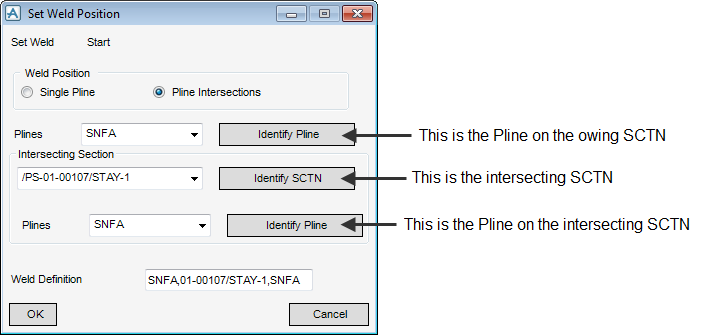
Select the Pline Intersections radio button. The available intersecting sections are populated in the list and the Set Weld Position window appears as shown in Figure 9:4.: Set Weld Position window (Pline Intersections).
|
|
Figure 9:4.
|
|
2.
|
Click on the upper Identify Pline and select the first (owning) Pline that requires the weld.
|
|
3.
|
Click Identify SCTN and select the section containing the intersecting Pline.
|
|
4.
|
Click on the lower Identify Pline and select the intersecting Pline.
|
