Multi-Discipline Supports
User Guide
Welding Application : Create a Weld on a Framework or Special
|
•
|
Select the Create Weld icon
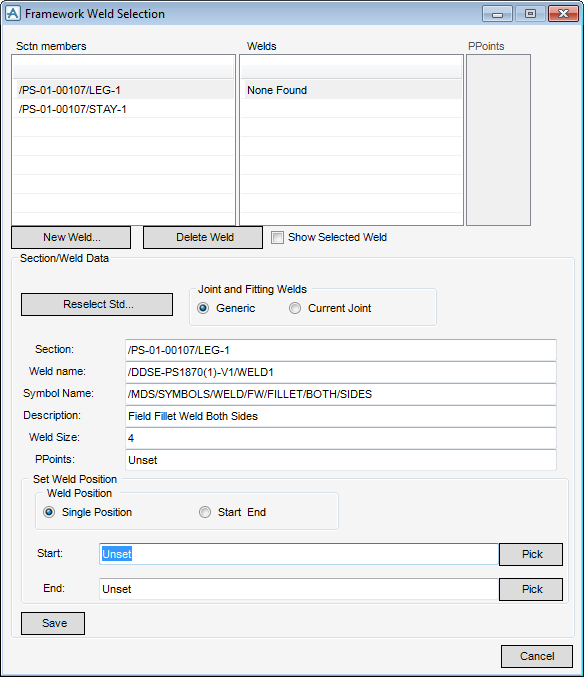
 from the MDS Framework or Special Framework window. The Framework Weld Selection window (Figure 9:1.: Framework Weld Selection window) is displayed. from the MDS Framework or Special Framework window. The Framework Weld Selection window (Figure 9:1.: Framework Weld Selection window) is displayed. |
|
Figure 9:1.
|
|
1.
|
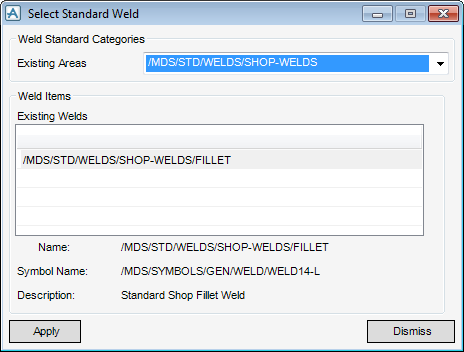
Click on New Weld. The Select Standard Weld window (Figure 9:2.: Select Standard Weld window) is displayed.
|
|
Figure 9:2.
|
|
3.
|
Click Apply.
|
Nothing happens in the database at this point. Information is passed from the Select Standard Weld window into the Framework Weld Selection window.
|
4.
|
Click on Save on the Framework Weld Selection window (Figure 9:1.: Framework Weld Selection window). The selection is written to the database.
|
