Diagrams
User Guide
With the Batch Formatting Rules in Diagrams you can select one or more formatting rules and apply them to a list of diagrams.
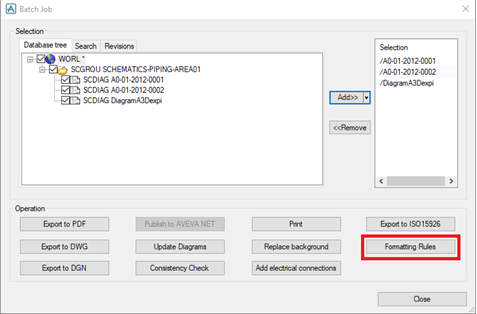
The button Formatting Rules in the Batch Job window is by default disabled and is enabled when a list of drawings are added for batch processing. Click the Formatting Rules button to open a new window where the formatting rules are selected.
|
Note:
|
To proceed with Batch Formatting Rules all open drawings must be closed.
|
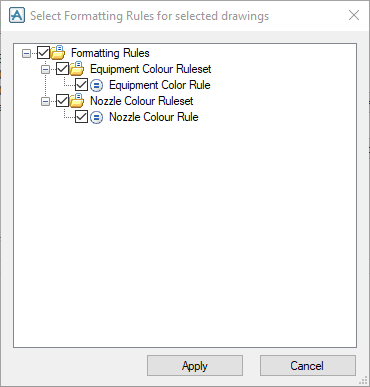
This window displays all the formatting rules that are already created in Diagrams Rules. Select the required rules and click the Apply button. This applies the selected formatting rules to the list of selected drawings in the Batch Job window.
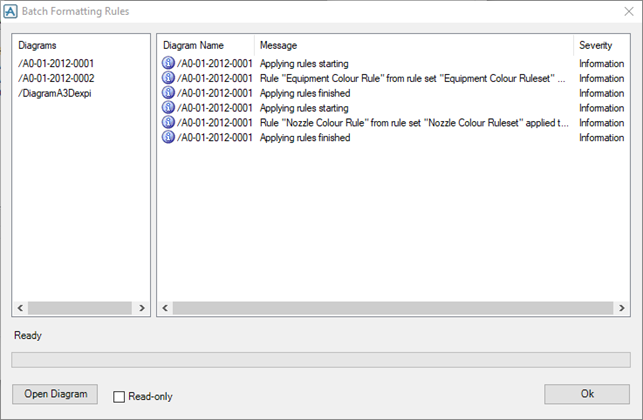
The result summary for each drawing is reported in the Diagram Name, Message and Severity columns in the right list view. The progress for diagrams can be seen in the Progress Bar as well as in the Status text above it. When the formatting rules are applied to the diagrams select the required diagram in the left list view and click Open Diagram.
To open the diagram in read-only mode, tick the Read-only check box and then click the Open Diagram button.
